


Shipping your online shop orders
Charges that you decide, the carrier chosen by your customer, the label and tracking through Sendcloud, or the carrier entered by hand.
Set your charges and your departure address
Expédition (Shipping) tab of Orders and items. Tick Proposer la livraison sur mon site (Offer delivery on my website), then your charges: a flat rate to the home, a flat rate to a pick-up point, and if you like, free delivery from a certain amount. A rate left empty is not offered. The default parcel weight is only used for items whose weight is not filled in on their record.
Below, D’où partent vos colis (Where your parcels leave from): your shipping address. Then Vos transporteurs, par Sendcloud (Your carriers, through Sendcloud): the key of your Sendcloud account, to create labels and track parcels.
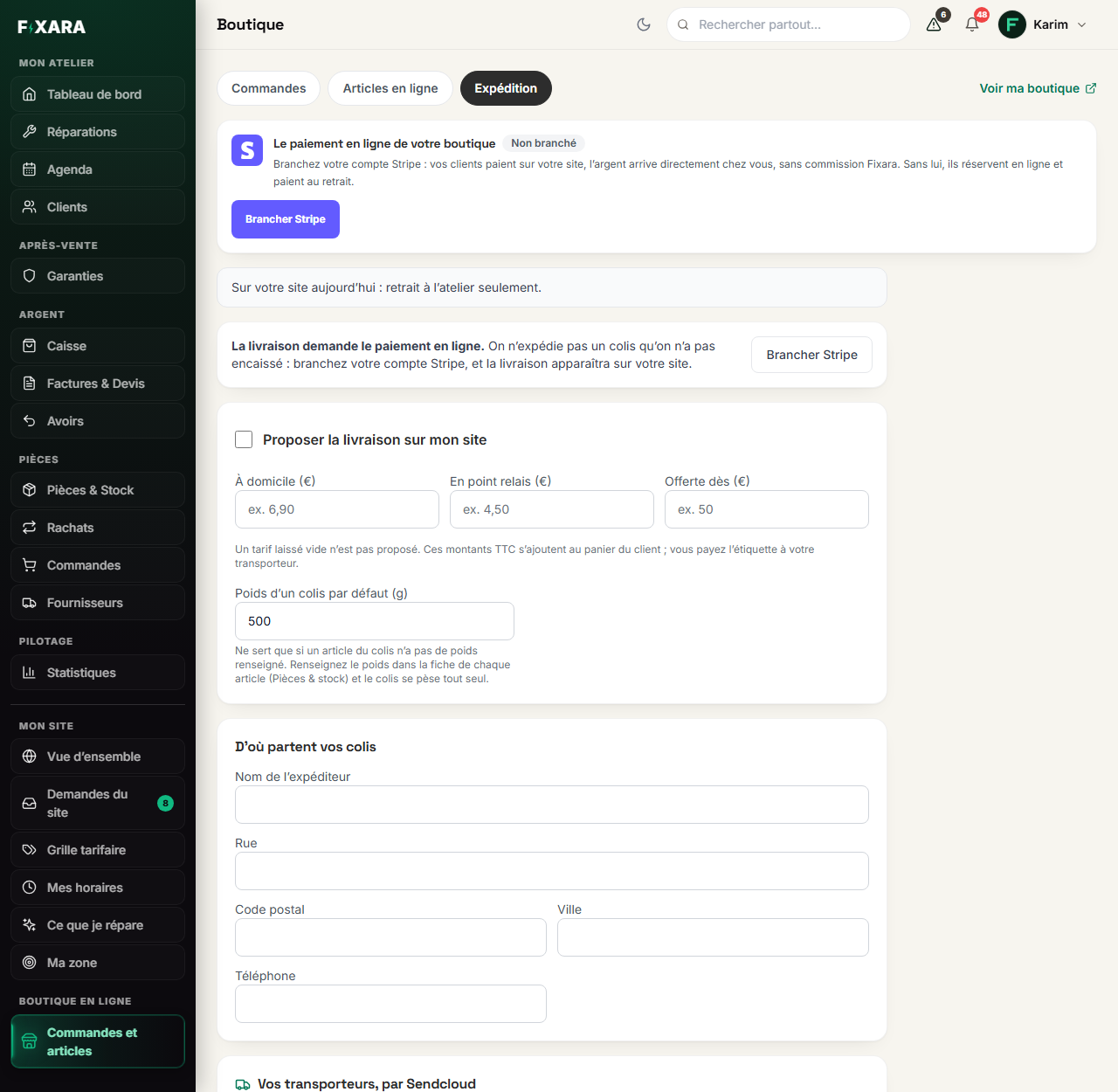 123
1The delivery tab.
2The address your parcels leave from.
3Sendcloud: labels, pick-up points and tracking.
- Delivery requires online payment: you do not ship a parcel you have not been paid for. As long as Stripe is not connected, your website only offers collection.
- Pick-up points require Sendcloud: it is what provides the list of pick-up points.
- Without Sendcloud, you can still ship to the home and enter the tracking number by hand.
Delivered or collected: for the whole shop, then item by item
In Expédition (Shipping), you choose for the whole shop: Proposer le retrait à l’atelier (Offer pickup) and Proposer la livraison sur mon site (Offer delivery). Then you say how a pickup is paid: customer’s choice (online or in store), in store only (Stripe is then only used for deliveries), or online only.
An item is an exception? Open its record in Parts & stock, block Comment le client le reçoit (How the customer gets it): À retirer seulement (Collection only, for a phone or a fragile or heavy item) or À livrer seulement (Delivery only). A basket mixing both is refused with a clear message: the customer places two orders.
You want to take payment for an item in store, even with Stripe connected? In the same block, Comment le client le paie (How the customer pays): Sur place seulement (In store only). The customer reserves it on your site, online payment is not offered, and the item is collected at the shop.
The item’s weight, on its record, weighs the parcel and gives the carrier’s real price. Without it, the parcel takes the default weight of the Shipping tab.
With Sendcloud, let the customer choose their carrier
Once Sendcloud is connected, the Vos transporteurs, par Sendcloud (Your carriers, through Sendcloud) block lists the services of your account, to the home and to a pick-up point. Tick the ones your customers can choose (8 at most), each at its price including VAT:
- Prix réel (Real price): the customer pays what the carrier charges you for the weight of their parcel. Fill in the weight of your items in Parts & stock;
- Prix fixe (Fixed price): the same price whatever the parcel.
If you like, add a minimum and maximum delay, in working days: your customer sees an estimated delivery date (with the real price, left empty, it is the carrier’s delay). On your shop, they choose their carrier, and its pick-up points appear on a map. The label goes to the one they chose.
The price the customer pays is always recalculated by Fixara when the order is placed: nobody can change it from their browser.
To offer free delivery, set the flat rate to zero
“0” in Offerte dès (Free from) means “no free delivery”, not “free from zero”. To offer free shipping to everyone, it is the flat rate you set to zero.
Tracking comes before the sale
An order’s Expédier (Ship) button creates the label (or records your tracking number), then records the sale. A parcel without tracking does not go out, and the label is never created twice. Your customer receives an “on its way” e-mail, with the tracking link, then “delivered”.
A customer sends their order back
With Sendcloud, you can send them a return label by e-mail. When the parcel arrives, Retour reçu (Return received) issues the credit note, puts the item back in stock, then refunds the customer, in that order.